Summary: Mastering France's BPM Analyzer automatically detects BPM, key, integrated LUFS, True Peak and dynamic range of your audio file in seconds. Free, no account required, compatible with WAV / MP3 / FLAC / AIFF up to 20 MB. Access the tool: mastering-france.fr/analyzer
Do you have a track and don't know what key it's in? Are you prepping a set and need to check the BPM of a hundred tracks? Do you want to know if your mix is streaming-ready before mastering? These three questions now have one answer: the Mastering France BPM Analyzer & Key Finder. This tool pairs naturally with our complete guide to audio mastering — giving you a precise diagnosis before any correction.
What is the BPM of a track?
BPM (Beats Per Minute) measures the speed of a music track. A 90 BPM track is slow — old-school rap, lo-fi, R&B. A 128 BPM track is classic house music. A 170 BPM track is typical drum & bass. Knowing the exact BPM of a track is essential for:
- DJ mixing — seamlessly transitioning between two tracks (beatmatching)
- Production — aligning samples, loops and effects to the grid
- Sync licensing — matching a voiceover, credits or film music
- Video editing — cutting on beats and key moments
Our BPM detection algorithm uses autocorrelation analysis applied to the full signal, which keeps it accurate even on unquantized productions, organic tracks (jazz, soul) or fluctuating tempos.
What is the key of a track?
The key of a track is the set of notes that make it up, organized around a central note called the tonic. For example, a track in D minor gravitates around D and primarily uses the notes of the natural minor scale. The key determines the general mood — minor keys are generally perceived as darker or more melancholic, major keys as brighter or more joyful.
Knowing the key of an audio file is useful in several cases:
- Harmonic mixing — transitioning between tracks that sound harmonious together (Camelot method)
- Sampling — finding the scale of a sample to play over without dissonance
- Remixing — rearranging a track by changing its key or adding elements
- Composition — identifying the scale of a reference track to write in the same universe
- Karaoke / live — finding the original key before transposing for a voice
What our tool analyzes beyond BPM and key
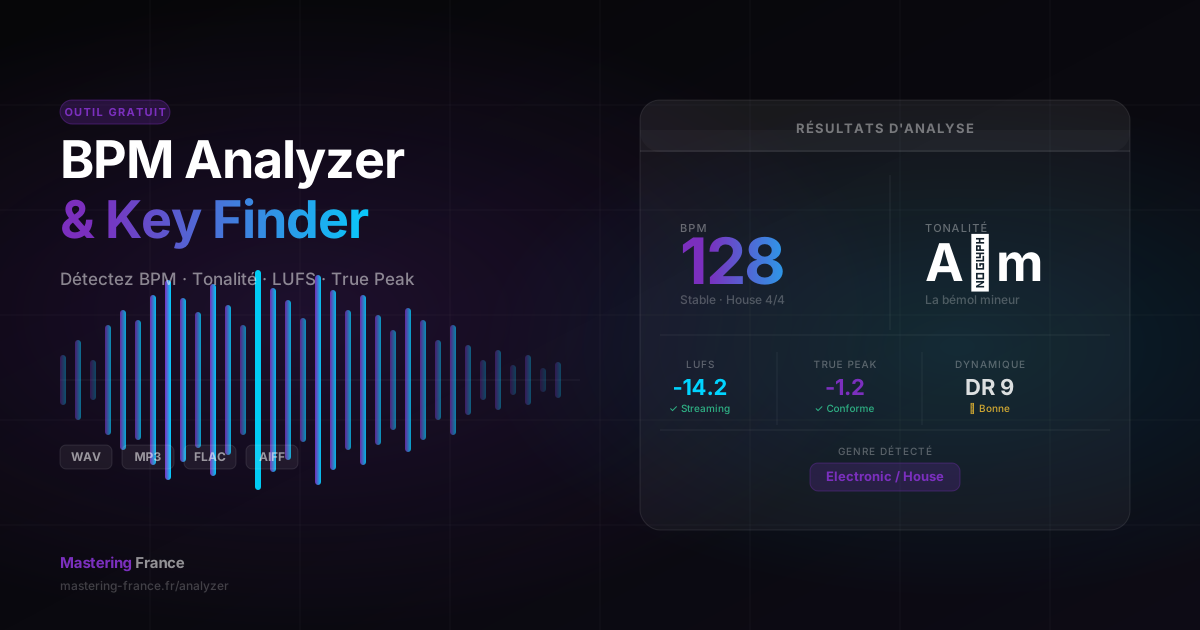
Mastering France's BPM Analyzer goes beyond simple tempo and scale detection. In a single analysis, it provides a complete report on the state of your audio file:
Integrated LUFS — the loudness level for streaming
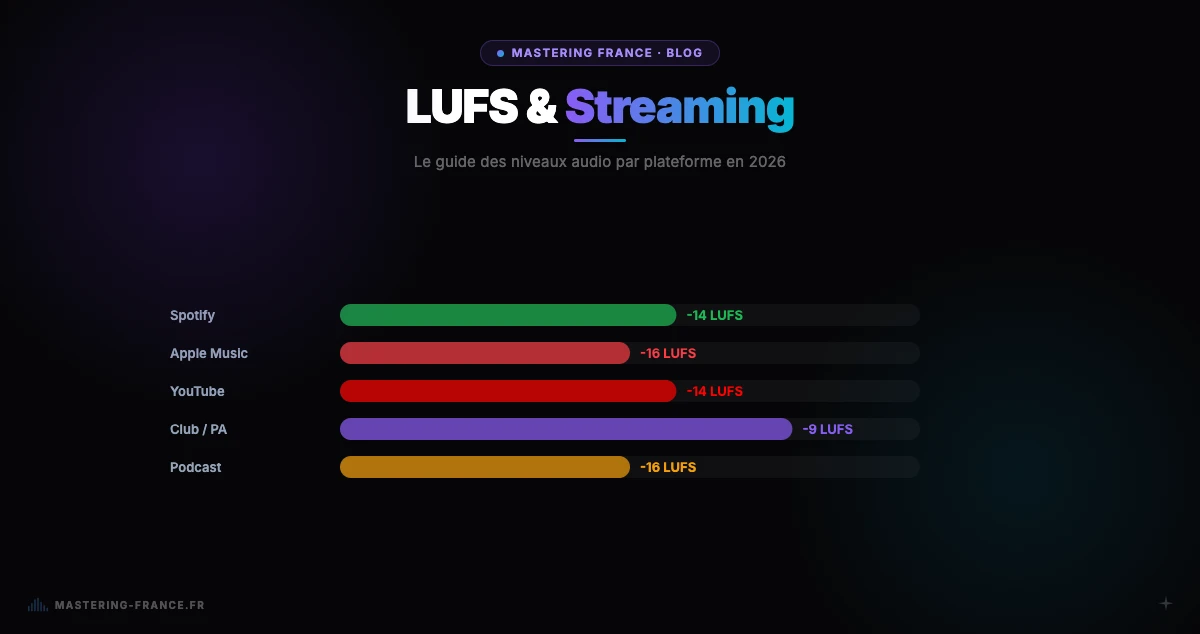
LUFS (Loudness Units relative to Full Scale) is the unit of measurement for psychoacoustic volume used by all streaming platforms. Spotify normalizes to -14 LUFS, Apple Music to -16 LUFS, YouTube to -14 LUFS. If your track exceeds these values, it will be automatically attenuated on playback — your compression work will be lost. If your track is below -20 LUFS, it will sound too quiet compared to other titles. Knowing your LUFS before mastering means avoiding nasty surprises at release. See our complete 2026 LUFS guide by platform for exact target values per service.
True Peak — protection against distortion
True Peak measures inter-sample peaks in the audio signal — the distortions that can appear during digital-to-analog conversion in playback devices. The recommended standard is True Peak < -1 dBTP for streaming, and < -0.5 dBTP for broadcast. Too high a True Peak creates audible distortion on mobile devices, Bluetooth speakers and low-end PA systems.
Dynamic Range (DR) — the space between loud and soft
Dynamic range indicates the gap between the loudest and softest passages of your track. A DR value of 12 or more means your track retains good dynamic breathing. A DR value of 5 or less indicates excessive compression — a sign of loudness war treatment that destroys the perception of groove and depth. This figure is particularly useful for club music producers, where too low a DR is immediately audible on a professional PA system.
Automatically detected genre
The tool automatically identifies the musical genre of your file from its spectral and rhythmic fingerprint. This information is used within Mastering France to adapt mastering presets (compression, EQ, LUFS target) to the specific genre of each track — rather than applying a generic treatment.
How to use the BPM Analyzer — step by step
- Go to mastering-france.fr/analyzer — no account required
- Drag and drop your audio file (WAV, MP3, FLAC or AIFF, up to 20 MB) into the upload zone
- The analysis starts automatically — allow 10 to 30 seconds depending on the file length
- Read the report: BPM, key, LUFS, True Peak, dynamic range, genre
- If LUFS or True Peak exceed streaming standards, master your track to correct them
The tool is completely free and requires no sign-up. The file is processed server-side and is not retained after analysis.
Supported formats and technical limits
- WAV (.wav) — recommended for best analysis accuracy
- AIFF (.aiff, .aif) — Apple standard, identical accuracy to WAV
- MP3 (.mp3) — supported, slight True Peak approximation due to lossy compression
- FLAC (.flac) — lossless compressed, optimal accuracy
- Maximum size: 20 MB — sufficient for most studio-quality tracks
Analyze vs master: what's the difference?
Audio analysis gives you a diagnosis — the current state of your file. Mastering corrects what needs fixing: it calibrates LUFS, controls True Peak, balances the frequency spectrum and improves the overall sonic consistency. If your analysis reveals issues (LUFS too high, True Peak > -1 dBTP, dynamic range too low), Mastering France's AI mastering can fix them automatically in minutes, from €2. Our guide on how to master a track for Spotify in 2026 covers every step of the process in detail.