Direct answer: master between -10 and -14 LUFS integrated depending on the genre. Streaming platforms automatically turn down tracks that are too loud — mastering at -6 LUFS gives you no advantage and destroys your dynamics.
You just mastered your track at -6 LUFS to make it "hit hard" on Spotify. Result: it sounds exactly as loud as everything else — but with crushed dynamics and a fatiguing sound. Worse, a less-compressed track mastered at -14 LUFS will often sound perceptually louder and better than yours after normalization.
This misunderstood mechanism pushes thousands of producers to over-compress their tracks for nothing. This guide explains exactly how streaming normalization works, and what LUFS level to target for each platform in 2026.
What is LUFS? Precise definition
LUFS vs dBFS: two very different measurements
dBFS (decibels Full Scale) measures the peak level of the digital signal. LUFS (Loudness Units Full Scale) measures loudness as perceived by the human ear over the duration of the track — per international standard ITU-R BS.1770. A track can have a high dBFS with a low LUFS (if peaks are short), or a high LUFS with a reasonable dBFS (if compression is aggressive).
Why platforms use LUFS
Streaming platforms use LUFS to automatically normalize the volume of all tracks. Without normalization, you'd jump between a soft jazz track and a metal track that blows your eardrums out. LUFS normalization guarantees a uniform listening experience — regardless of the mastering loudness the artist chose.
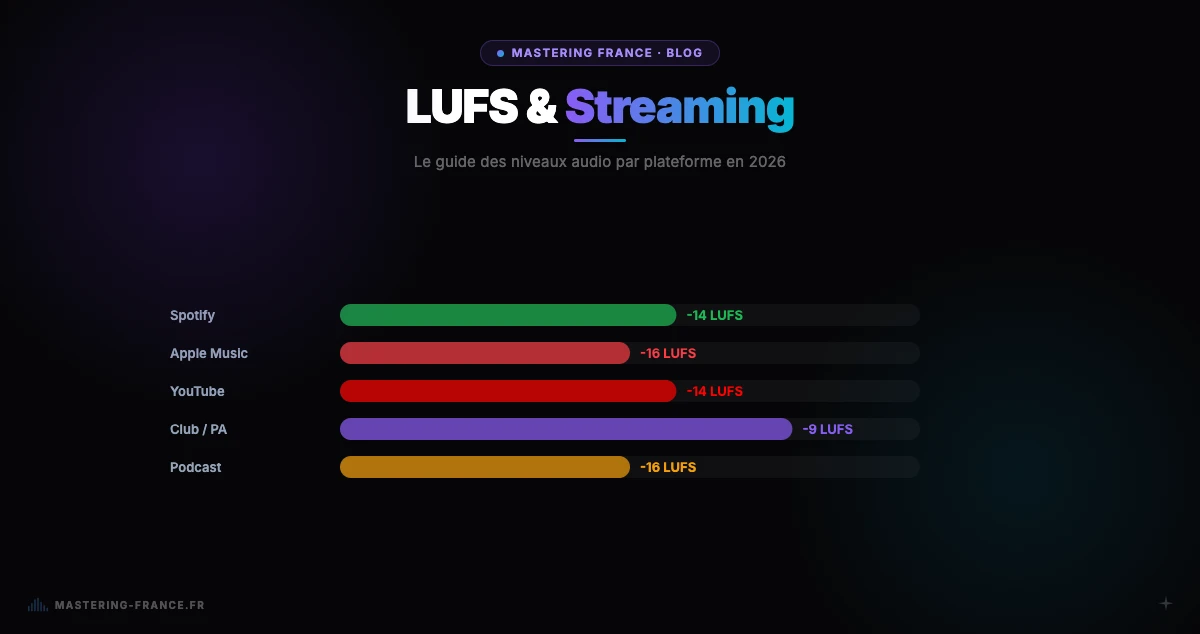
LUFS targets by streaming platform: 2026 chart
The chart below sums up each platform's normalization level, the recommended True Peak, and what happens to your track if it's louder than the target.
| Platform | Target LUFS | Recommended True Peak | If your master is louder |
|---|---|---|---|
| Spotify | -14 LUFS | -1 dBTP (-2 if master > -14 LUFS) | Turned down to -14 LUFS ("Loud" mode: -11 LUFS) |
| Apple Music | -16 LUFS | -1 dBTP | Turned down by Sound Check |
| YouTube | -14 LUFS | -1 dBTP | Turned down (never turned up if too quiet) |
| Amazon Music | -14 LUFS | -1 dBTP | Turned down |
| Tidal | -14 LUFS | -1 dBTP | Turned down |
| Deezer | -15 LUFS | -1 dBTP | Turned down |
| SoundCloud | No normalization | -1 dBTP | Played as is — watch out for clipping |
| Podcast (Apple Podcasts) | -16 LUFS | -1 dBTP | Recommendation, no strict normalization |
| Radio / TV (EBU R128) | -23 LUFS | -1 dBTP | Turned down by the broadcaster |
| Club / DJ set | -8 to -6 LUFS | -1 dBTP | Not normalized |
In practice, a single streaming master between -14 and -10 LUFS with True Peak at -1 dBTP works on every platform. For a platform-by-platform breakdown, read our Spotify, Apple Music and YouTube comparison.
What happens if you master too loud?
Concrete example: your track is mastered at -6 LUFS and uploaded to Spotify (target -14 LUFS). Spotify automatically turns the volume down by 8 dB. The result: all the compression and limiting work to "push" the sound only results in irreversible dynamic loss, with zero perceived loudness gain for the listener. Your track will sound worse than a less-compressed track mastered at -14 LUFS.
This is exactly what you observe comparing recent commercial masters: Drake, Dua Lipa, Aphex Twin — all mastered between -10 and -13 LUFS, rarely below -9. The streaming loudness war is over.
Integrated, short-term, momentary LUFS: what's the difference?
- Integrated LUFS: average over the entire track — the value platforms use for normalization
- Short-term LUFS: 3-second rolling average — useful to spot overly loud passages
- Momentary LUFS: 400 ms rolling average — for detecting instantaneous spikes
- True Peak (dBTP): actual peak level after D/A conversion — must stay below -1 dBTP to avoid inter-sample distortion
- LRA (Loudness Range): measures the track's dynamic range — a high LRA means more dynamic contrast
What LUFS should you target by genre?
Dynamic genres (acoustic, classical, jazz, folk)
Target -16 to -14 LUFS. These genres benefit from a wide dynamic range — Apple Music's -16 LUFS normalization suits them perfectly. Over-compressed mastering would kill the nuances that make them valuable.
Pop, R&B, hip-hop, rock
Target -13 to -11 LUFS. These genres have a more aggressive presence by nature. Spotify will turn it down slightly, but controlled compression at this level still preserves convincing musical dynamics.
Electronic, EDM, techno (streaming)
Target -11 to -10 LUFS. Impact and punch are essential to these genres. Spotify's normalization to -14 LUFS will bring your master down by 1 to 4 dB — a light reduction that preserves the sound's vitality.
Club and DJ sets (not normalized)
Target -8 to -6 LUFS. DJ sets don't go through automatic platform normalization. A higher level is club convention — but True Peak remains mandatory at -1 dBTP maximum.
Summary: target LUFS by genre
| Genre | Target LUFS (streaming) | Spotify turn-down |
|---|---|---|
| Classical, jazz, acoustic, folk | -16 to -14 LUFS | 0 dB |
| Pop, R&B, rock | -13 to -11 LUFS | 1 to 3 dB |
| Rap, trap, drill | -11 to -9 LUFS | 3 to 5 dB |
| Afrobeats, afropop | -12 to -10 LUFS | 2 to 4 dB |
| Electronic, EDM, techno | -11 to -10 LUFS | 3 to 4 dB |
| Club / DJ set (outside streaming) | -8 to -6 LUFS | Not applicable |
Go further by genre: rap and hip-hop mastering, trap, drill and electronic or afrobeats and afropop.
Common LUFS mistakes
Mastering at -6 LUFS to "sound loud"
This is the most common mistake. After Spotify normalization, your track will sound identical in volume but with destroyed dynamics. Result: a fatiguing, breathless sound that holds up less well over time.
Measuring the wrong LUFS value
Some measure short-term or momentary LUFS instead of integrated LUFS. Only integrated LUFS (measured over the full track) is used by platforms for normalization. Verify your plugin is showing "Integrated."
Ignoring True Peak
Inter-sample peaks (distortion between samples) can occur even if your digital peak is below 0 dBFS. The universal recommendation: limit True Peak to -1 dBTP, and -2 dBTP for streaming. Without True Peak limiting, your track can distort on playback on certain devices.
Using one LUFS target for all versions
A streaming master (-14 LUFS) and a club master (-8 LUFS) are two different files. Don't deliver your club master to Spotify — the dynamics will be massacred. Create two separate versions, as offered by Mastering France's Club preset.
How to measure LUFS for free
- Youlean Loudness Meter — free VST/AU/AAX plugin, compatible with all DAWs
- iZotope Loudness Meter — included in free versions of several plugins
- Your DAW's built-in analysis (Ableton Live, Logic Pro, Pro Tools, Cubase)
- Mastering France — displays the integrated LUFS measured on your delivered master
Master at the level that serves your track musically, preserve dynamics, and let the platforms handle the volume. With Mastering France, the Streaming (-14 LUFS), Club (-8 LUFS) and Podcast (-16 LUFS) presets are precisely calibrated for each distribution context — without compromising dynamics.