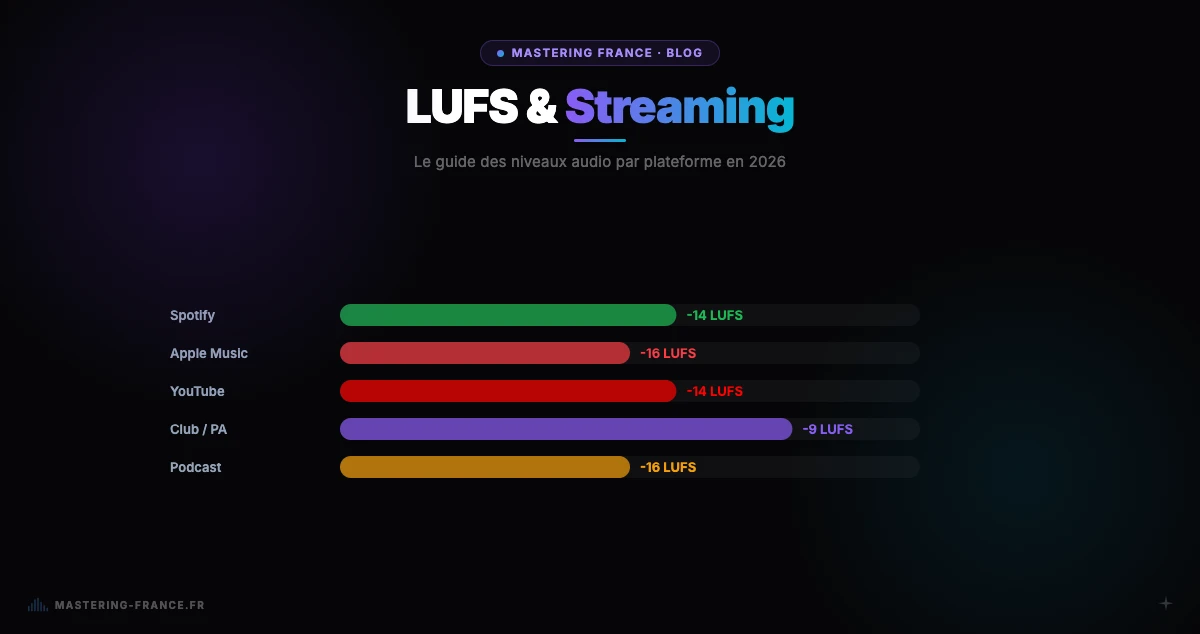
Quick answer: to master for Spotify, target -14 LUFS integrated, True Peak at -1 dBTP, export as 24-bit WAV at 44.1 kHz. For Apple Music: -16 LUFS. For YouTube: -14 LUFS. An AI service like Mastering France handles all of this automatically in under 3 minutes.
You've spent weeks perfecting your track. It's mixed and ready. But without streaming-optimized mastering, you'll lose up to 30% of the sonic impact your listeners will perceive — a sound less present, less competitive than other tracks in playlists.
This guide explains exactly what to do, step by step, for optimal results on Spotify, Apple Music, YouTube and other platforms in 2026.
Step 1: Prepare your mix before mastering
The perfect export
- Export your mix as 24-bit or 32-bit float WAV (never as MP3)
- Peak level max at -3 to -6 dBFS — leave headroom for mastering
- No compressor or limiter on the master bus
- Check mono compatibility (all elements remain audible in mono)
- Export at 44.1 kHz or 48 kHz depending on your project
Export mistakes to avoid
Never leave a compressor or limiter active on your master bus during export — even a light one. And never export as MP3 for mastering: the lossy format amplifies artifacts instead of correcting them. See our guide on common mixing mistakes for a complete checklist.
Step 2: Choose the right LUFS level for each platform
- Spotify: target -14 LUFS integrated (auto-normalization at -14)
- Apple Music: target -16 LUFS integrated (Sound Check normalizes to -16)
- YouTube: target -14 LUFS integrated (Content ID normalization)
- Tidal: target -14 LUFS integrated
- SoundCloud: no normalization — -10 LUFS is a good compromise
- Deezer: target -15 LUFS integrated
- Amazon Music: target -14 LUFS integrated
For more on LUFS targets by genre and mistakes to avoid, see our complete guide on LUFS and streaming in 2026.
Step 3: Master with AI or an engineer
AI mastering — the solution for independents
For an independent artist, AI mastering offers the best quality/price/turnaround ratio. With Mastering France, you upload your mix (WAV, AIFF, FLAC, MP3), choose your preset (Streaming for Spotify/Apple Music, Club for DJ sets), and get your master back in under 3 minutes. The AI automatically handles EQ, compression, limiting, and target LUFS.
Studio mastering — when is it necessary?
Studio mastering is recommended for ambitious albums with heavy marketing investment, complex projects (classical music, acoustic jazz), or when you're seeking artistic dialogue with the engineer. For a single or streaming EP, AI mastering today produces indistinguishable results. Learn more in our AI vs studio comparison.
Step 4: Check your master before uploading
- Measure integrated LUFS with Youlean Loudness Meter (free) or your DAW
- Verify True Peak is below -1 dBTP
- Listen on at least 3 systems (monitors, headphones, phone)
- Check in mono: bass doesn't disappear, vocals remain intelligible
- Compare with a same-genre reference at equal LUFS level
- Check for clicks or artifacts at the start and end of the file
Step 5: Export in the right format for upload
Recommended formats
- Spotify / Apple Music / Tidal: 24-bit WAV at 44.1 kHz or 48 kHz (distributors convert)
- YouTube: 48 kHz WAV or MP3 320 kbps
- SoundCloud: 16-bit WAV or MP3 320 kbps
- Distributor (DistroKid, TuneCore, CD Baby): 24-bit WAV 44.1 kHz in 99% of cases
One file for all platforms?
Yes. A 24-bit WAV master at 44.1 kHz, calibrated at -14 LUFS integrated and -1 dBTP True Peak, works for all streaming platforms. Platforms targeting less than -14 LUFS (Apple Music at -16) will slightly lower your master without quality degradation. That's why -14 LUFS is the universally recommended streaming level.
Common mistakes when mastering for streaming
Mastering too loud
Mastering at -6 LUFS to "sound loud" on Spotify is the most common mistake. After normalization, your track will sound identical in volume but with destroyed dynamics. See our LUFS and streaming guide to understand why.
Not creating a club version when needed
If you produce electronic music for the club, the streaming master (-14 LUFS) won't be enough for DJ sets — it will be too quiet on PA systems. Create a second club master at -8 LUFS.
Uploading without checking True Peak
Uncontrolled inter-sample peaks can cause distortion on playback, particularly on Apple devices. Always verify your True Peak is below -1 dBTP before submitting to your distributor.
With Mastering France, this entire process is automatic: upload your WAV, choose the Streaming preset, get your master calibrated at -14 LUFS with controlled True Peak in 3 minutes. First credit free — try it now.