2026 YouTube mastering parameters: integrated LUFS target -14 LUFS (electronic/trap: -11 to -10 LUFS), True Peak maximum -1 dBTP, export format 24-bit WAV, mandatory mono check below 80 Hz. These four rules guarantee a professional, powerful sound on YouTube with no algorithmic degradation.
You spent hours on your beat. It sounds exactly as you wanted in your DAW. You upload it to YouTube — and something's off. The bass seems less present, the 808 lost weight, the track sounds softer than expected. This is not an illusion.
YouTube automatically processes all video audio — codec compression, LUFS normalization, AAC encoding. If your music isn't mastered for this treatment, YouTube will degrade it. This guide gives you the exact parameters to make your beat sound professional on YouTube, regardless of genre.
Why your beat loses power on YouTube
YouTube's codec compression degrades un-mastered audio
YouTube re-encodes all audio as AAC 128 kbps or Opus 160 kbps depending on video resolution. This lossy compression particularly affects uncontrolled bass (stereo sub-bass, uncompressed 808) and unlimited transients. Pre-mastering stabilizes the signal before this encoding and limits degradation.
The -14 LUFS normalization flattens unprepared masters
If your beat is mastered at -6 LUFS (a still-common practice from the Spotify loudness war), YouTube automatically turns it down by 8 dB. Result: you get both reduced perceived loudness AND crushed dynamics. Conversely, an un-mastered beat at -22 LUFS will be nearly inaudible on mobile.
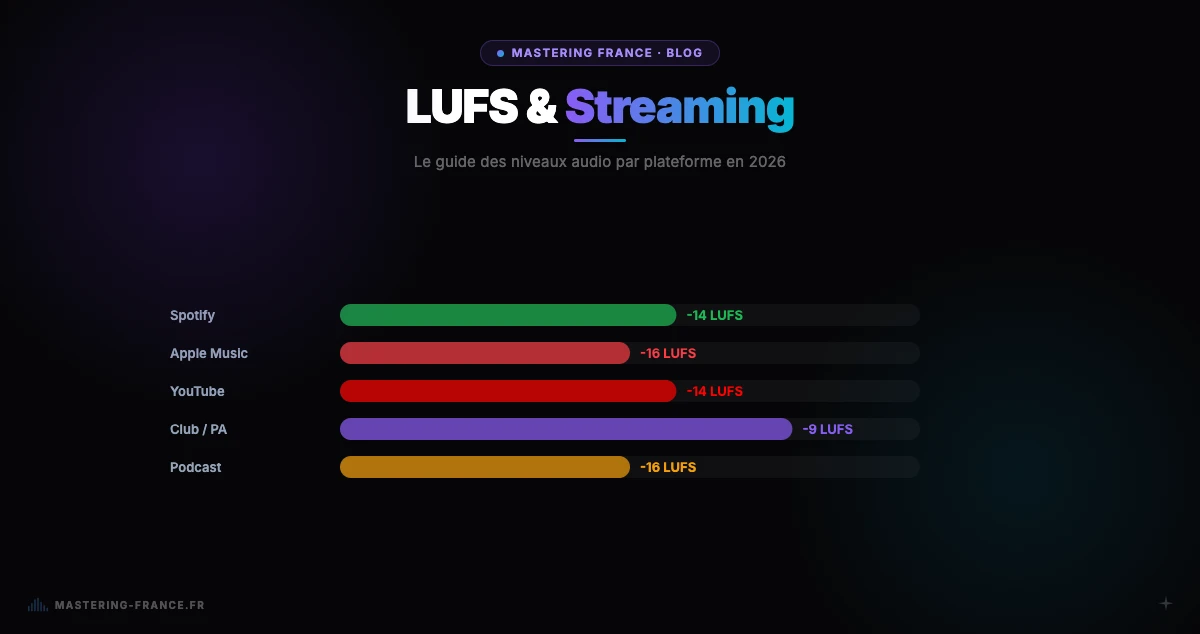
For a complete explanation of the LUFS mechanism and targets by platform, read our complete 2026 streaming LUFS guide with platform table.
Complete guide: mastering your beat for YouTube in 4 steps
Step 1 — Prepare the mix before export
- Put sub-bass in mono below 80 Hz (prevents power loss after AAC mono encoding)
- Verify no limiter is active on the master bus (leave at least -3 to -6 dBFS of headroom)
- Validate the mix on headphones + speakers + phone — YouTube penalizes mobile abandonment
- Export as 24-bit WAV — never MP3 for mastering
Step 2 — Choose the right LUFS level by genre
- Trap, drill, hip-hop: -10 to -9 LUFS integrated — impact and 808 power preserved after YouTube normalization
- R&B, soul, afro trap: -11 to -10 LUFS — warm dynamics preserved
- Electronic, house, EDM: -11 to -10 LUFS — punch and centered kick
- Pop, rock YouTube: -13 to -12 LUFS — presence and dynamic headroom
- Lo-fi, acoustic, video background music: -16 to -14 LUFS — natural dynamics
Step 3 — Limit True Peak to -1 dBTP
True Peak (real peak after D/A conversion) must stay below -1 dBTP to avoid inter-sample distortion after YouTube's AAC encoding. Without True Peak limiting, your track can distort on certain devices even if your digital level appears below 0 dBFS. Mastering France applies this automatically.
Step 4 — Export and verify
- Export as 24-bit WAV 44.1 kHz (or 48 kHz if your video project is in 48 kHz)
- Verify final integrated LUFS with Youlean Loudness Meter (free) or in your DAW
- Test in mono mode to verify the 808/bass doesn't disappear
- Compare with a YouTube reference from the same genre at the same volume level
AI mastering vs studio for YouTube: what to choose?
For musician YouTubers who publish regularly, AI mastering is the most consistent solution: results in 3 minutes, €2/track pricing, available 24/7. For an ambitious album with very specific artistic intent, a human engineer retains value. Read our complete AI mastering vs traditional studio comparison to decide by your profile.
Mastering with Mastering France: YouTube-optimized preset by genre
Mastering France's Streaming preset is calibrated specifically for YouTube, Spotify, Apple Music, and streaming platforms. It automatically targets the right LUFS based on genre detected by the AI, applies True Peak limiting to -1 dBTP, and generates a detailed report with before/after measurements (integrated LUFS, True Peak, LRA, dynamics).
Master your beat free at Mastering France — first credit free, results in 3 minutes, no credit card required. If you're not sure your mix is ready for mastering, first check our guide to 5 mixing mistakes that ruin your mastering.
See the difference: before and after mastering on a YouTube video
Want to see concretely what mastering changes on a real YouTube video — with before/after measurements, compared waveforms, and detailed feedback? See our dedicated article: Before / After — What Mastering Really Changes on a YouTube Video.