Key point: YouTube rewards audience retention. Poor audio quality drives viewers away in under 30 seconds — which tanks your algorithm ranking. Audio mastering normalizes your sound to -14 LUFS (YouTube's official target), corrects frequency imbalances, and makes your video pleasant to listen to on any device.
You've perfected your visuals, your editing, your thumbnails. Your YouTube videos have substance. Yet the stats don't lie: viewers leave before the end. If your retention rate is below 40%, before looking for a content problem, check your audio.
Studies in cognitive psychology on multimedia perception show that viewers tolerate poor visuals far longer than poor audio. Below a certain audio quality threshold, message comprehension drops, cognitive fatigue rises, and abandonment is inevitable. On YouTube, that abandonment directly translates to an algorithmic penalty.
Audio on YouTube: the most underestimated factor by creators
What research says about video abandonment
Academic research on audio-visual perception is clear: a 50% degradation in audio quality causes a 40% average drop in watch time. An equivalent degradation in video quality causes only 18% additional abandonment. Concretely: your audience prefers a blurry video with good sound to a 4K video with bad audio.
The YouTube algorithm is directly sensitive to watch time
YouTube's recommendation algorithm ranks your videos based on multiple signals — and watch time (average view duration) is one of the most powerful. A video with poor audio generates high abandonment in the first 30 seconds, which YouTube reads as a negative relevance signal. Result: fewer recommendations, less visibility, fewer subscribers. Improving your audio quality directly improves your YouTube ranking.
The 5 most common audio problems on YouTube videos
- Pervasive background noise (fan, traffic, mic hiss) — immediate auditory fatigue
- Volume level too low — viewers forced to turn up, then blasted by the louder next video
- Clipped or distorted sound — painful to listen to, perceived as amateur
- YouTube normalization ignored: videos mastered at -6 or -20 LUFS with no coherence
- Background music too loud, drowning out the voice or main audio
These five problems share one thing: they're all solved by audio mastering. Professional mastering calibrated for YouTube corrects each of them before your video ever goes live.
The YouTube standard: -14 LUFS, and what it changes for your videos
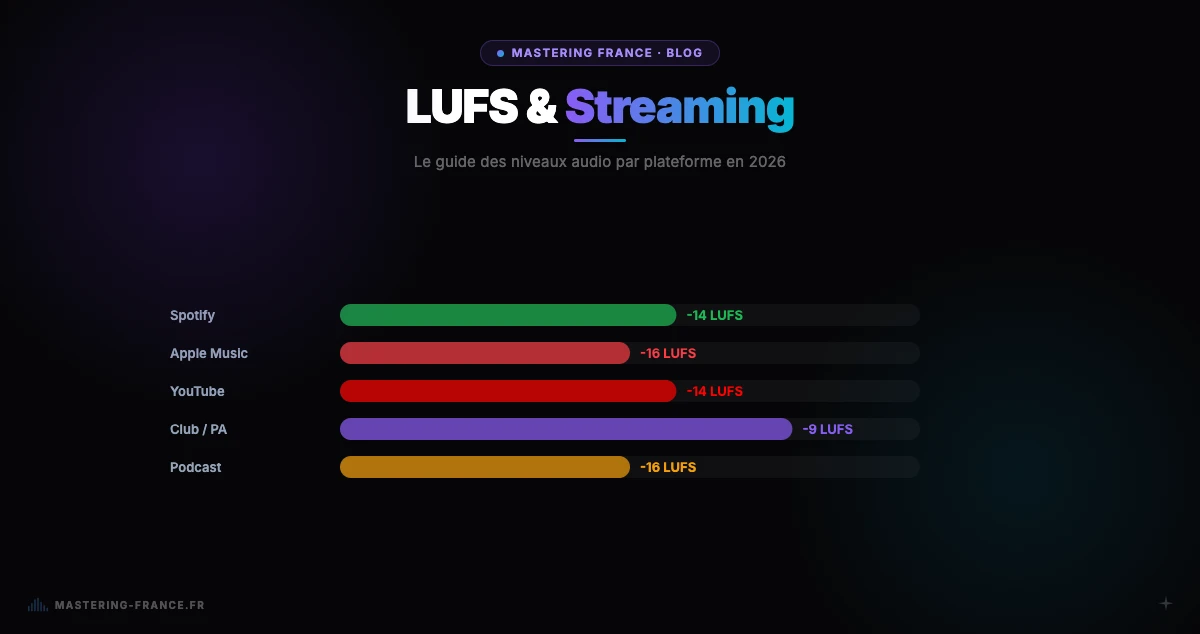
YouTube automatically normalizes volume to -14 LUFS integrated on all videos. If your audio is too loud (-6 LUFS), YouTube turns it down automatically — degrading your dynamics in the process. If your audio is too quiet (-20 LUFS), it becomes inaudible on mobile. Audio mastered precisely to -14 LUFS passes without any degradation.
For a complete understanding of this mechanism and LUFS targets for each platform, see our complete 2026 guide to streaming LUFS targets.
Audio mastering: the concrete solution to sounding professional on YouTube
What mastering concretely does for your YouTube videos
- Precise normalization to -14 LUFS: YouTube passes your audio through unchanged
- Frequency spectrum equalization: clear voice, controlled bass, no sibilance
- Transparent compression: dynamics preserved without crushing the sound
- True Peak limited to -1 dBTP: no distortion on Bluetooth, headphones, or phone
- Mono compatibility verified: listeners on built-in speakers hear everything correctly
- Improved signal-to-noise ratio: voice comes through cleanly without complex manual EQ
Mastering France: master your YouTube video audio in 3 minutes
Mastering France applies an AI trained on thousands of professional masters to optimize your audio to YouTube standards. Upload your audio file (MP3, WAV, AIFF, FLAC), select the Streaming preset, and get a master calibrated to -14 LUFS in under 3 minutes. Try Mastering France free — first credit on us, no credit card required.
Before and after mastering: the difference on a YouTube video
The transformation is often spectacular. For a concrete demonstration with measurable before-and-after results on a musical YouTube video, read our detailed analysis: Before / After — What Mastering Really Changes on a YouTube Video.
How to master your YouTube audio with Mastering France: step by step
- Step 1 — Export your audio from your editing software as WAV or MP3 (ideally 24-bit WAV)
- Step 2 — Upload the file to Mastering France (accepted formats: WAV, AIFF, MP3, FLAC)
- Step 3 — Choose the Streaming preset (-14 LUFS, YouTube-optimized)
- Step 4 — Get your master back in under 3 minutes
- Step 5 — Import the mastered audio into your video editing software as a replacement
For musician YouTubers who post music productions, see our dedicated guide: How to Master Your Beat for YouTube in 2026 — with exact parameters by genre.