Quick answer: to get a song on Spotify, go through a distributor (DistroKid, TuneCore, CD Baby…), which delivers your track to Spotify and the other platforms. Prepare a WAV master, a square 3000 × 3000 px cover and your track info, then schedule the release at least 7 days ahead so you can pitch it to editorial playlists.
Spotify doesn't accept direct uploads from artists: tracks always arrive through a distributor or a label. The good news is that one upload gets you on Spotify, Apple Music, Deezer, Amazon Music, YouTube Music and Tidal.
What to prepare before you start
| Item | What you need | Tip |
|---|---|---|
| Audio file | WAV 44.1 kHz, 16 or 24-bit | The final master, not the mix |
| Loudness | -14 to -10 LUFS, True Peak below -1 dBTP | Check with a LUFS meter |
| Cover art | Square 3000 × 3000 px, JPG or PNG, RGB | No blurry text or brand logos |
| Track info | Title, artists, features, songwriters, genre, language, explicit content | Identical spelling everywhere |
| Release date | At least 7 days out, ideally 2 to 4 weeks | Leaves time to pitch |
The 7 steps to put your music on Spotify
1. Finish the mix and master
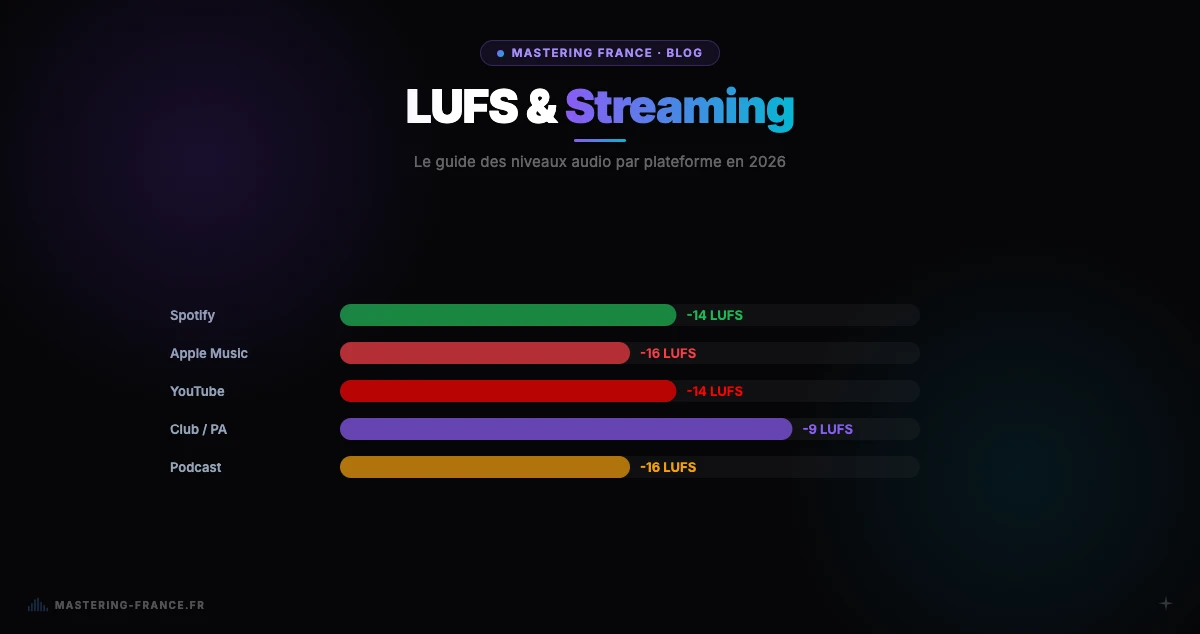
The track must be mixed and then mastered: that's the file that will be streamed. Spotify normalizes loudness to -14 LUFS, so there's no point mastering too loud. It's all explained in our Spotify mastering guide, and you can check your file with our online LUFS meter.
2. Prepare the cover art
A square 3000 × 3000 px image, JPG or PNG, in RGB. Distributors often reject blurry covers or ones that contain brand logos, links or information that doesn't match the track. Check your distributor's rules.
3. Choose a distributor
Distributors work on three main models. Compare current prices on their sites, as they change often.
| Model | Examples | Best for |
|---|---|---|
| Annual subscription, unlimited releases | DistroKid | You release often |
| Pay per release or plans | CD Baby, TuneCore | A few releases a year |
| Free, with a commission on earnings | RouteNote (free tier) | No budget to start |
4. Fill in the track information
Title, artist name, features, songwriters, genre, language, and the explicit tag if needed. The distributor assigns an ISRC code to each track and a UPC to the release. Use exactly the same artist name on every release, otherwise your tracks may end up on a different profile.
5. Choose the release date
Schedule the release at least 7 days ahead, ideally 2 to 4 weeks. That gives the distributor time to deliver the track, and you time to pitch it to Spotify's editors.
6. Claim Spotify for Artists and pitch the track
Once your first release is delivered, claim your profile on Spotify for Artists. There you can pitch an unreleased track to playlist editors. A track pitched at least 7 days before release is added to your followers' Release Radar; placement on an editorial playlist is never guaranteed.
7. Plan the promotion
Announce the release on your socials, share a pre-save link if your distributor offers one, prepare short videos (Spotify Canvas, Reels, TikTok) and tell your circle on release day: early plays matter.
How much does a song earn on Spotify?
Spotify doesn't pay a fixed rate per stream: revenue is shared based on each track's share of listening. Estimates published by industry media are around $0.003 to $0.005 per stream for the recording. Since April 2024, a track must reach at least 1,000 streams over the last 12 months to generate royalties. To estimate your earnings, use our streaming royalties calculator.
Common mistakes
- Sending the mix instead of the master, or an MP3 instead of a WAV
- Scheduling the release for the next day: you can't pitch the track
- A rejected cover (blurry, with logos, wrong size)
- A different artist name from one release to the next
- Mastering too loud, thinking it will sound louder on Spotify
- Forgetting credits (songwriters, features): they're hard to fix later